Did the change work?
Apple’s and Google’s own numbers, with every listing change marked and the 14 days before and after.

Winch tracks your keywords in 175 countries on the App Store and Google Play, rewrites your listing in every language and draws your store art. You ask. It does the heavy lifting.
Runs on the AI you already pay for
Your Claude Pro or Max plan through Claude Code, your ChatGPT plan through Codex, an OpenRouter key, or a model running locally in Ollama. No AI credits to buy from Winch and no second bill.
Keywords
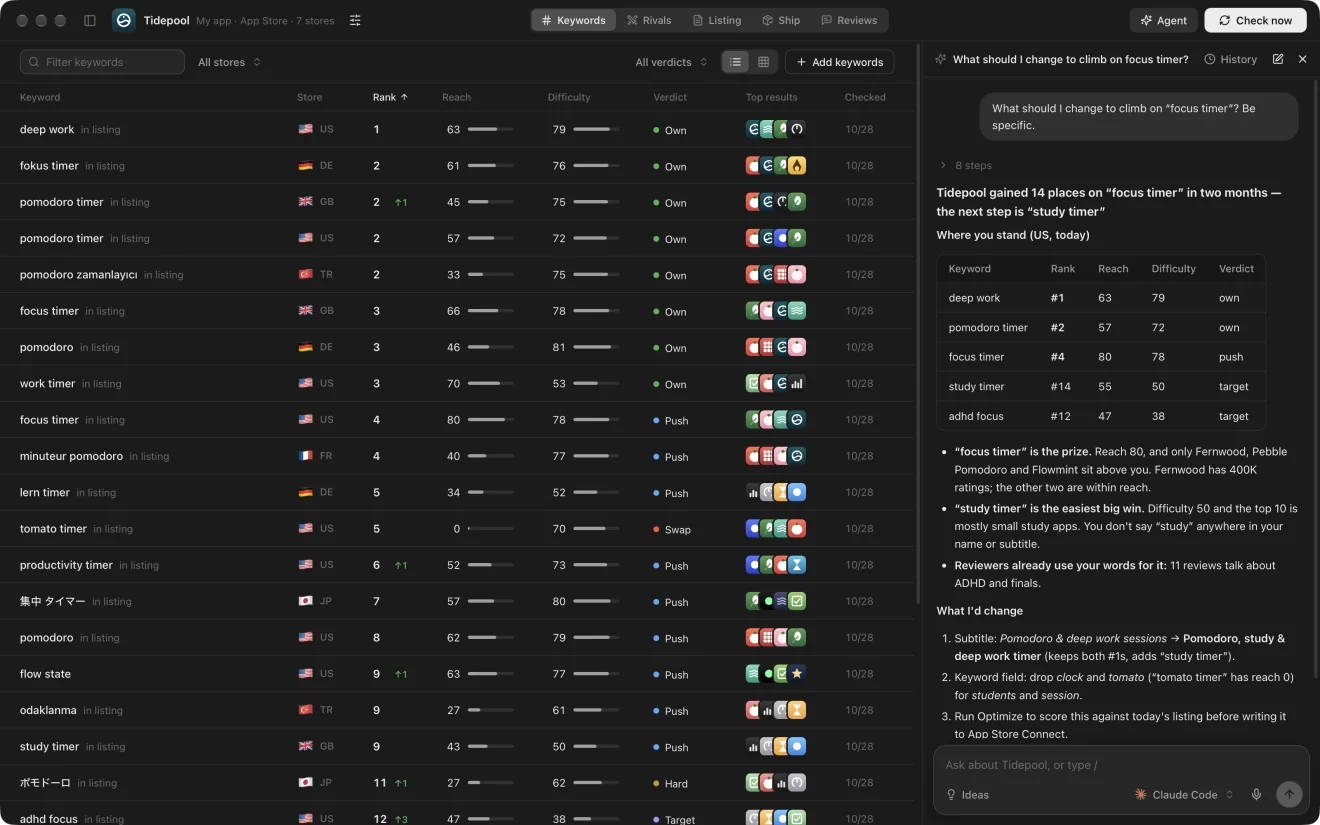
Neither Apple nor Google shows search volumes, and ranks are visible only by searching yourself, country by country. Winch runs those searches for you and turns them into one board: your rank with its 7-day trend, how many people a search reaches, how hard its top 10 is to beat, and what to do about it.

Competitors
Winch lists the apps that sit above yours on your own searches, in every country, and watches the ones you track: their ranks next to yours, every name, subtitle and version change, and new apps entering your top 10. Or type /competitors and the agent finds them for you.

The agent
The agent sees everything Winch stores: every app on both stores, ranks and their history, rivals, listings, reviews, saved reports and earlier conversations. It runs new searches when it needs them, then answers with numbers you can check.
MCP
The same 71 tools as an MCP server for Claude Code, Codex, Cursor and any other client. It works with the app closed, and anything it starts shows live in the window.
$claude mcp add winch -- /Applications/Winch.app/Contents/MacOS/Winch --mcplist_appsTracked apps with their store, countries and kindadd_appTrack an App Store or Google Play app from a link or idremove_appStop tracking a competitor, once you confirmfind_my_appsApps in a connected account that Winch doesn't track yetupdate_appChange an app's brief and stores, or a plan's namelist_marketsAll 175 countries with the languages each store readssearch_storeSearch either store: top results, reach and difficultyget_boardEvery keyword with rank, reach, difficulty and verdictadd_keywordsTrack keywords in chosen stores, optionally localizedremove_keywordStop tracking a keyword in one store or allrun_checkRun today's searches and record rank alertsrank_historyThe daily rank for one keyword in one storerivalsThe apps that most often outrank yourshead_to_headYour rank next to each tracked competitor, per keywordbrainstormNew keyword ideas from your AIget_listingsPublic, App Store Connect and Play Console listings and draftssave_draftSave a draft for one language, cut to the store's limitsset_listing_textsThe description, promotional text and What's Newstore_coverageEvery language each store reads, repeats and free charactersstore_versionThe App Store Connect version drafts go intooptimize_listingMeasure the missed searches, then write three scored optionsget_optimizationThe options, their scores and each language writtenmore_optionsWrite more options, unlike the ones thereadd_optionAdd your own option, checked and scoredupdate_optionChange an option in place; it keeps its numberremove_optionRemove an optionmeasure_phrasesSearch up to 30 phrases so options are scored on themchoose_listingChoose the main listing; it becomes the draftlocalize_listingWrite the other languages, testing local phrases in each storeedit_languageReplace one language's text with your ownpick_local_phraseUse another tested phrase in one languageget_studioCaptures, captions, look, sizes and what's drawnset_studioChange captions, the look, sizes, languages and orderwrite_captionsYour AI captions each capture from what it showstranslate_captionsTranslate the captions into every languagerender_screenshotsDraw every language, size and capture at the store's sizegenerate_iconsDraw icon ideas with an OpenRouter image modelset_iconPick an icon; writes both stores' sizesget_screenshotsThe ranking apps' screenshots for a search, next to yourscompare_screenshotsA vision model's read: patterns, score, changes, captionsget_screenshot_reportsSaved comparisonsread_reviewsRead new reviews from the stores and your consolesget_reviewsStored reviews, by stars, store, version or wordsreview_statsAverage, distribution, by version, store and monthmine_reviewsThemes, keyword ideas, angles and fixes from your AIget_review_reportsSaved review readsdraft_review_replyDraft a reply and keep it on the reviewsave_reply_draftKeep your own reply text as the draftget_readinessWhat the store still needs before review, item by itemupdate_checklistTick the steps only the store's website doescreate_planPlan an app that isn't in a store yetget_launch_planThe plan's steps, names, winnable keywords and draftscheck_nameIs a name free to own in search, on both storessuggest_namesName ideas within 30 characterschoose_namePick the launch namecategory_leadersA category's top free chart in one storelink_planMove a plan onto its store recordget_activityChanges, rank moves, releases, milestones and low reviewswatch_nowLook at every tracked app nowget_resultsThe store's numbers, the change log and before-and-afterget_changesThe listing change logsync_resultsRead newly delivered reports from Apple or Play Consolewrite_briefingWrite this week's briefingget_briefingThe latest briefingapp_historyAn app's daily ratings, version, installs and nameget_conversationsEarlier conversations with the agentpublish_draftsWrite drafts to App Store Connect or Play Consoleupload_screenshotsUpload the drawn set and graphicspost_review_replyPost a reply to a reviewset_categorySet the App Store category and a game's genresenable_resultsAsk Apple to start analytics reportsEach one asks before it writes, and the in-app agent never gets them.
Also from a terminal: Winch --ask "Which keywords did I lose this week?"
Listing
Optimize measures the searches your keywords miss, writes your name, subtitle and keyword field several ways, and scores each option against today's listing on real searches. Choose one and every other language is written from it, with local phrases tested in each language's own store.

Reach and difficulty against today's listing, with the searches each option covers marked in its fields.
Keyword space shows the words each store sees across your languages, the repeats and the room left.
Into the App Store Connect version open for editing, or one edit in Play Console. A before-and-after first, never a submission.
Store art
Point the Studio at your app's screenshots. Your AI writes a caption for each one from what it shows and the searches your listing targets, translates them, and Winch draws every size each store takes, on your Mac, in seconds. iPhone 6.3", 6.9", iPhone Duo and iPad on the App Store; phone, tablets and the feature graphic on Google Play.

Reviews and screenshots
Hand it your reviews, or a competitor’s: themes with counts and real quotes, keyword ideas in your reviewers’ own words, and fixes ranked by impact. Hand it a search: it lines up the first screenshots of the apps that win, scores yours out of 10 and writes caption lines to try.


And the rest of the job
Apple’s and Google’s own numbers, with every listing change marked and the 14 days before and after.
Rank moves, rivals’ listing and version changes, new apps in your top 10, milestones and new low reviews.

Check a name on both stores, find keywords you can win and draft the listing, before the app exists.

Everything the store needs before review, read live from App Store Connect or Play Console.

What moved and why, the week’s reviews, what rivals did, and three things to do. Waiting on Home.

The first screenshots of the apps that win a search, side by side with yours.

Yours
Everything Winch learns stays on your Mac. No telemetry, no tracking, no account to create.
App Store Connect and Play Console with your own keys. AI through the tools you already pay for. Winch has no model of its own and keeps no copy of your prompts.
Listings, store art, the category, review replies and analytics requests each wait for your confirmation. The agent is never even offered them.
Pricing
$69once
A one-time license for the whole app, activated on your Macs with a key. It works offline too, and nothing you make is ever lost.
Already have a key? Manage your licenses
The one you already pay for. Claude Code with your Claude Pro or Max plan, Codex with your ChatGPT plan, OpenCode, a local Ollama model, or an OpenRouter key. Winch finds them on your Mac and runs them for you. It has no model of its own and sells no AI credits.
No. Ranks, reach, difficulty, rivals, public listings and reviews all come from the stores' public pages. Connecting your account adds your own listings, reviews with replies, the store's numbers in Results, the Ship checklist and writing back.
Never. Every store write waits for your confirmation and shows exactly what it will change. The agent never writes to a store on its own.
Reach is how many people a search reaches, estimated from the apps that rank for it, since neither store shares search counts. Difficulty is how hard its top 10 is to beat.
Yes. Add any app by its link or name, or let Winch suggest the ones that outrank you. You see its ranks next to yours, and every change it makes to its listing.
Yes. Ranks, listings, store art, reviews and the store's own numbers all work for Google Play apps too, side by side with the App Store.
On your Mac. Winch talks only to the stores and the AI you choose.
Any Mac with macOS 13 or later, Apple Silicon or Intel. Windows isn’t supported yet.